0%

Contex Engineer

上下文工程 Context Engineer

  • LangChain《Context Engineering for Agents》2025 年 7 月 2 日

什么是上下文工程?

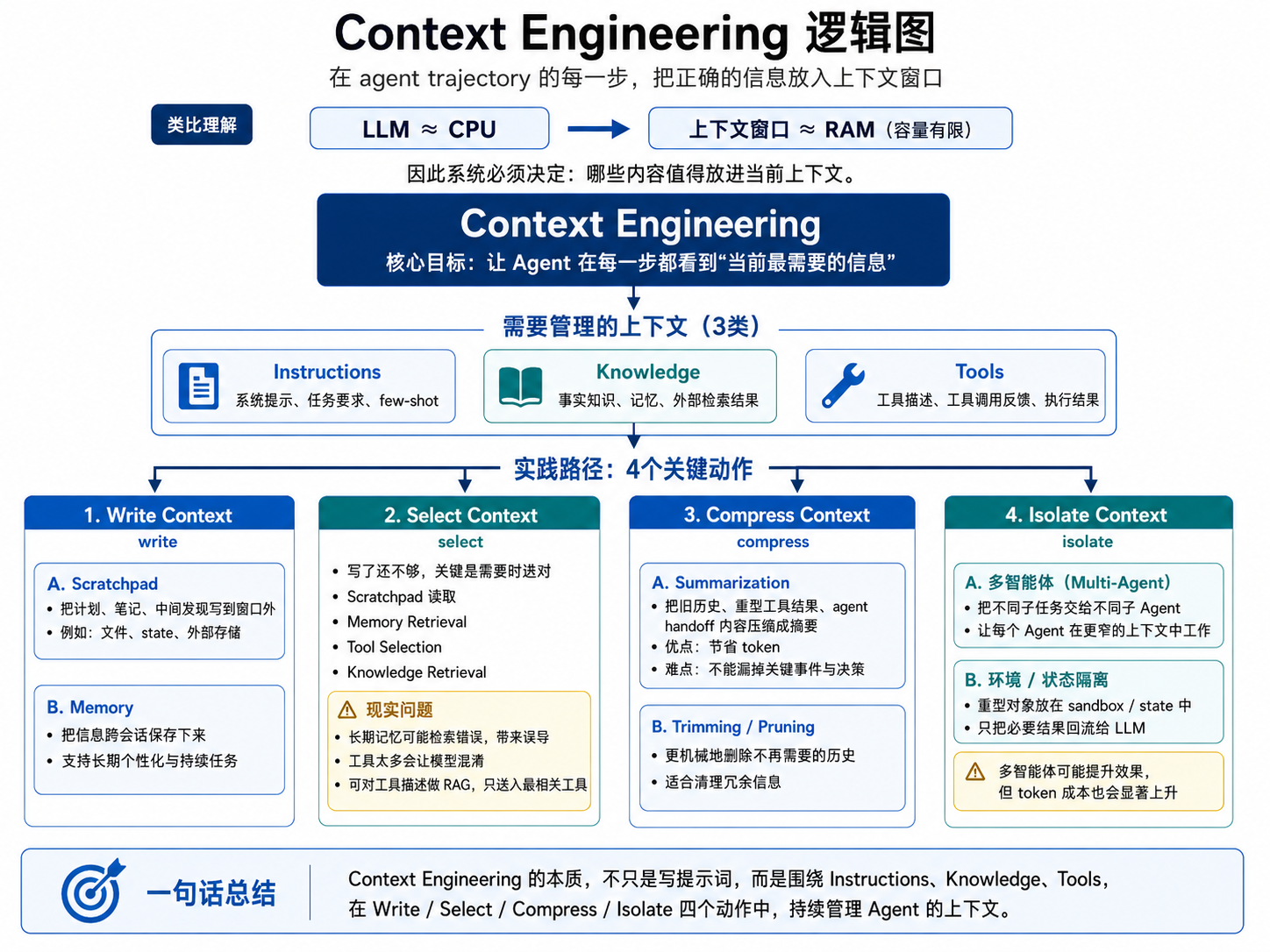
上下文工程就是在 agent trajectory(agent行为路径) 的每一步,把正确的信息放到上下文窗口里。LLM像CPU,上下文窗口像RAM,RAM再大也是有限的,所以系统必须决定哪些内容值得放进去,文章随后把需要管理的上下文分成三类:instructions、knowledge、tools。换句话说,提示、记忆、few-shot、工具描述、事实知识、工具反馈,本质上都属于“上下文”。

文章用四个动词概括实践路径:write、select、compress、isolate

Write Context 主要谈两样东西。第一是 scratchpad:把计划、笔记、中间发现写到窗口外,例如写入文件或写入 state。第二是 memory:把信息跨会话保存下来。

Select Context 的重点是:写了还不够,更难的是在需要时选对。文章分别谈 scratchpad 读取、memory retrieval、tool selection 和 knowledge retrieval。它特别提醒两个现实问题:一是长期记忆检索容易“取错”,甚至让用户觉得上下文窗口“不再属于自己”;二是工具太多会让模型混淆,因此可以对工具描述做 RAG,只把最相关的工具送进当前调用。

Compressing Context 把压缩分成两条思路。第一条是 summarization:用模型把旧历史、重型工具结果或 agent-to-agent handoff 内容压缩成摘要。第二条是 trimming/pruning:更机械地删掉不再需要的历史。文章强调,这两者都能省 token,但 summarization 的难点是不能漏掉关键事件和决策。

Isolating Context 提出两种常见做法。第一是 多智能体:把不同子任务交给不同子 agent,让每个 agent 在更窄的上下文里工作。第二是 环境或状态隔离:例如 Hugging Face 的 CodeAgent 把重型对象放在 sandbox / state 里,只有必要结果才回流给 LLM。文章同时提醒,多智能体可能提升结果,但 token 代价也会显著上升。

工作流与代码解读

原文正文更像“方法论地图”,并没有塞入很长的完整代码,而是把读者引到 LangGraph memory、Bigtool、summarization/trim utilities、sandbox、多代理库等实现入口

示例一:短期记忆如何让 agent 记住同一线程中的信息

1
2
3
4
5
6
7
8
9
10
11
12
13
14
15
16
17
18
19
20
21
22
23
24
25
26
27
28
29
from langchain.agents import create_agent
from langgraph.checkpoint.memory import InMemorySaver

def get_user_info() -> str:
"""查当前用户信息。"""
return "没有额外资料。"

agent = create_agent(
model="google_genai:gemini-3.5-flash",
tools=[get_user_info],
checkpointer=InMemorySaver(), # 关键:把状态按 thread_id 持久化
)

thread_config = {"configurable": {"thread_id": "1"}}

# 第一轮:建立上下文
agent.invoke(
{"messages": [{"role": "user", "content": "Hi! My name is Bob."}]},
thread_config,
)

# 第二轮:在同一个 thread_id 下再次调用
response = agent.invoke(
{"messages": [{"role": "user", "content": "What's my name?"}]},
thread_config,
)

print(response["messages"][-1].content)
# 预期:类似 "You are Bob!"

这段代码演示的是 LangChain Agent 的短期记忆机制

通过 InMemorySaver + thread_id,agent 可以在同一段对话中记住之前发生过的事情。

InMemorySaver 负责保存状态
thread_id 负责区分是哪一段对话
agent.invoke 负责每轮调用
response["messages"][-1].content 负责取最后回答

thread可以由用户自己新建

1
2
用户新建一个聊天窗口 → 新 thread
用户继续在当前聊天里发消息 → 同一个 thread

示例二:压缩上下文时,trimming 与 summarization 的差别

1
2
3
4
5
6
7
8
9
10
11
12
13
14
15
16
17
18
19
20
21
22
23
24
25
26
27
28
29
30
31
32
33
34
from langchain_core.messages.utils import trim_messages, count_tokens_approximately
from langchain.chat_models import init_chat_model
from langgraph.checkpoint.memory import InMemorySaver
from langgraph.graph import StateGraph, START, MessagesState

model = init_chat_model("claude-sonnet-4-6")

def call_model(state: MessagesState):
# 只保留最近、最相关的一部分消息
messages = trim_messages(
state["messages"],
strategy="last",//截取策略,最近保留
token_counter=count_tokens_approximately,
max_tokens=128, //保留文本最大token
start_on="human", //从用户对话开始截取
end_on=("human", "tool"), //从用户消息结束
)
response = model.invoke(messages)
return {"messages": [response]}

checkpointer = InMemorySaver()
builder = StateGraph(MessagesState)
builder.add_node(call_model)
builder.add_edge(START, "call_model")
graph = builder.compile(checkpointer=checkpointer)

config = {"configurable": {"thread_id": "1"}}
graph.invoke({"messages": "hi, my name is bob"}, config)
graph.invoke({"messages": "write a short poem about cats"}, config)
graph.invoke({"messages": "now do the same but for dogs"}, config)
final_response = graph.invoke({"messages": "what's my name?"}, config)

print(final_response["messages"][-1].content)
# 官方示例输出:Your name is Bob, as you mentioned when you first introduced yourself.

这段代码展示的是 trimming:不让旧历史无限增长,而是按 token 预算裁掉消息列表的前段与此对应,LangChain 官方还提供 SummarizationMiddleware:它不是简单删除,而是先做一次独立的 LLM 摘要,再把旧消息替换成 summary message,并永久写回 state

如果你想把“摘要压缩”写成 middleware,官方模式如下:

1
2
3
4
5
6
7
8
9
10
11
12
13
14
from langchain.agents import create_agent
from langchain.agents.middleware import SummarizationMiddleware

agent = create_agent(
model="gpt-5.4",
tools=[...],
middleware=[
SummarizationMiddleware(
model="gpt-5.4-mini",
trigger={"tokens": 4000}, # 超过阈值时触发摘要
keep={"messages": 20}, # 保留最近消息
),
],
)

它的预期行为不是固定字符串,而是一个机制:当对话超出 token 阈值时,旧消息会被压成 summary message,未来轮次再也看不到原始旧消息,只看到摘要后的状态。

示例三:工具太多时,如何先检索工具再调用工具

1
2
3
4
5
6
7
8
9
10
11
12
13
14
15
16
17
18
19
20
21
22
23
24
25
26
27
28
29
30
31
32
33
34
35
36
37
38
39
40
import math
import types
import uuid
from langchain.chat_models import init_chat_model
from langchain.embeddings import init_embeddings
from langgraph.store.memory import InMemoryStore
from langgraph_bigtool import create_agent as create_bigtool_agent
from langgraph_bigtool.utils import convert_positional_only_function_to_tool

# 把 Python math 库函数批量转成工具
all_tools = []
for function_name in dir(math):
function = getattr(math, function_name)
if not isinstance(function, types.BuiltinFunctionType):
continue
tool = convert_positional_only_function_to_tool(function)//内置函数转化为agent可调用的工具描述
if tool:
all_tools.append(tool)

tool_registry = {str(uuid.uuid4()): tool for tool in all_tools}

# 把“工具描述”写入带向量索引的 Store
embeddings = init_embeddings("openai:text-embedding-3-small")
store = InMemoryStore(
index={
"embed": embeddings,
"dims": 1536,//向量维度
"fields": ["description"],
}
)
for tool_id, tool in tool_registry.items():
store.put(
("tools",),
tool_id,
{"description": f"{tool.name}: {tool.description}"},
)
# 构建 agent
llm = init_chat_model("openai:gpt-4o-mini")
agent = create_bigtool_agent(llm, tool_registry).compile(store=store)

实现一个带有简单上下文功能的agent

未完待续

-------------到底咯QAQ嘎嘎-------------